Use prefabs
Intermediate Programmer Designer
Prefab instances can be added to a scene in Game Studio or instantiated through code at runtime.
Add a prefab to a scene in Game Studio
To instantiate a prefab, drag and drop it from the Asset view onto a scene.
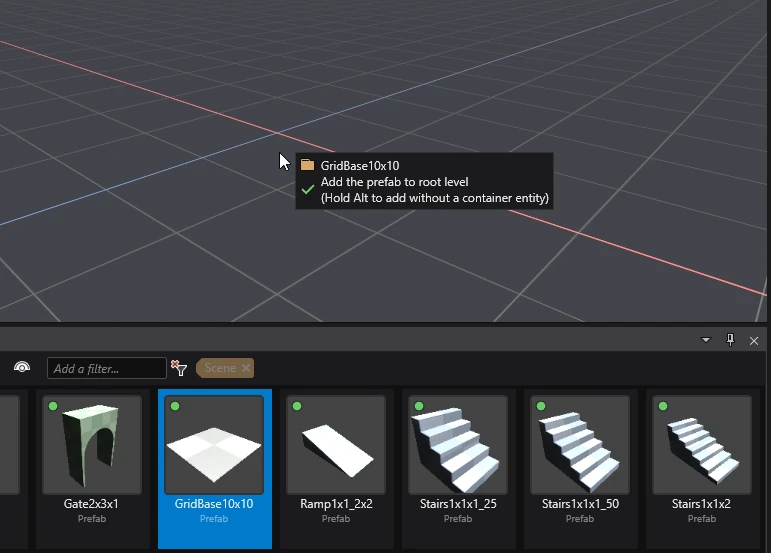
By default, Game Studio creates an empty parent entity with the prefab's entities as its children. The Entity tree displays the prefab parent name in green, next to the child entities.

Tip
If you don't want to create a parent entity for the prefab, hold Alt when dropping it into the scene.
Break link to prefab
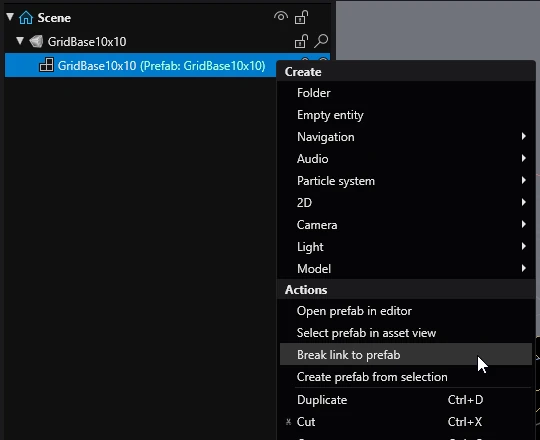
After adding a prefab instance to a scene, you are able to break the link between the prefab and any of its child entities. This means the child entity will no longer be affected by changes you make to the prefab.
To do this, in the Scene editor, right-click a child entity or entities and select Break link to prefab.
Instantiate a prefab at runtime
To use a prefab at runtime, you'll need to instantiate it and then add the newly created entities to a scene or parent in code.
public class Example : StartupScript
{
    public Prefab MyPrefab { get; set; }

    public override void Start()
    {
        // Create entities from a prefab
        var entities = MyPrefab.Instantiate();
        // Add entities to the entity's scene.
        Entity.Scene.Entities.AddRange(entities);
    }
}
For more information about using entities in code, visit Entities.
Note
Changes made to instantiated entities from a prefab at runtime do not affect the base prefab.